PCB Test Point Comparison Tool
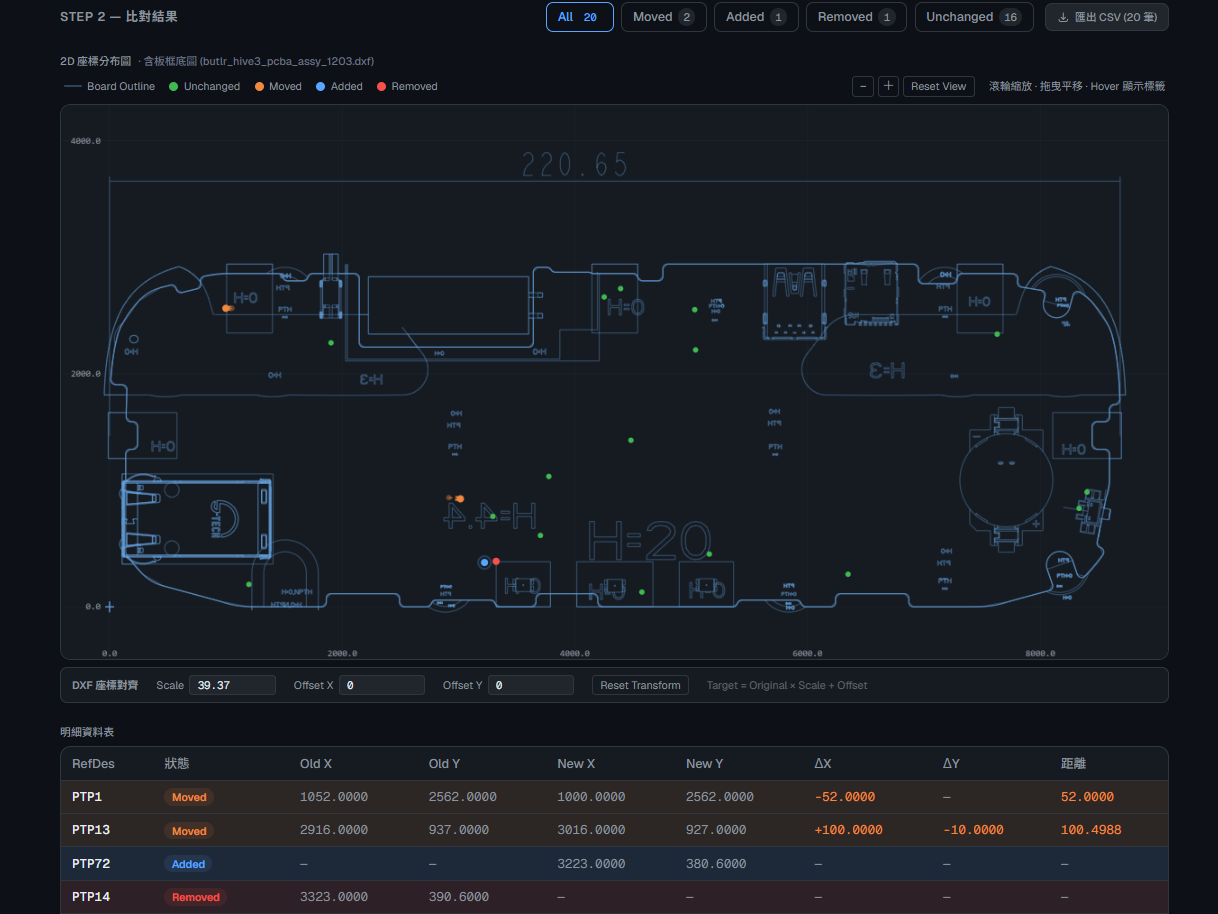
Compares test-point coordinates in old and new OrCAD reports during a hardware revision and labels them Unchanged, Moved, Added, or Removed. Supports a DXF board-outline overlay, allowlist filtering, and mil↔mm coordinate alignment. All processing stays in the browser so CAD data is not uploaded.
- Role
- Design and implementation
- Year
- 2026
- Last updated
- Next.js
- OrCAD
- DXF
- Canvas
- Claude Code
Outcome:Combined old-versus-new test-point differences, target-list filtering, and a board-outline overlay in one browser tool.

Problem and use case
After a PCB revision, engineers need to identify which test points in the old and new OrCAD reports were retained, moved, added, or removed. Coordinate values alone make it difficult to see how a change relates to board edges and holes. Drawing every point on the board can also hide the area that actually needs review in the current revision.
This tool puts report comparison, target test-point filtering, and a DXF board-outline overlay in one browser interface so engineers can inspect revision differences.
Role and responsibilities
I designed and implemented the tool, including OrCAD report parsing, comparison rules, coordinate overlay, and the user interface, with Claude Code assisting development. When parsing or coordinate issues appeared, I adjusted the implementation against real report structures and rendered results.
Constraints and design considerations
- CAD data may be confidential, so file parsing and comparison both run in the browser.
- OrCAD-exported HTML does not always match an expected set of table columns or structure, so the parser cannot be based on an imagined format.
- HTML test points and the DXF board outline may use different units and origins; importing both does not imply that they are aligned.
- A full-board point view creates visual noise, so users need to specify the test points relevant to the current revision.
Solution and key decisions
Correct the parser with real reports
The first parser failed to find data. After inspecting the OrCAD HTML source, I adjusted column detection with actual table fragments and extracted RefDes, X, and Y from the report instead of relying on an AI-assumed table format.
Filter before comparison
I added a Target List allowlist that selects specified test points before the core comparison. This keeps both the canvas and the result table focused on the scope of the current revision.
Adjust board-outline coordinates in the browser
The tool can place a DXF board outline behind the results and provides scale plus X/Y offset controls. The transform is Target = (Original × Scale) + Offset. The default scale of 39.37 represents mm-to-mil conversion, but users must still confirm the actual origin and units.
Implementation and architecture
The interface uses Next.js App Router, React, and Tailwind CSS. The browser's native DOMParser reads HTML; a parser in the project reads DXF geometry; Canvas draws test points, the board outline, and displacement vectors.
- Load old and new HTML reports, with an optional Target List and DXF board outline.
- Parse report columns and coordinates. If a Target List is present, filter both versions first.
- Match old and new test points by RefDes, calculate coordinate differences, and classify each point as Unchanged, Moved, Added, or Removed.
- Apply DXF scale and offset, then overlay the board outline and test points on the same canvas.
- Show filterable details and visual results, with CSV export.
Results and verification
The tool now presents difference categories, target filtering, and the board-outline overlay in one working view. During development, I verified that columns could be read from real OrCAD tables and inspected the overlay while adjusting scale and origin offsets.
These are qualitative records of features and operational results. I have not established quantitative tests for time saved, error reduction, or performance improvement, so I do not report estimated figures as outcomes.
Known limitations
- Reports must still expose recognizable RefDes and coordinate columns; arbitrary CAD formats are not accepted directly.
- DXF parsing focuses on supported geometric entities and board-outline layers and does not replace a full CAD viewer.
- Users must verify overlay units and offsets. Visual alignment does not mean electrical, mechanical, or manufacturability checks are complete.
- Matching is based on RefDes. If naming changes, the tool cannot infer that two entries represent the same physical test point.